Best Speaker Bars for Monitors to Enhance Your Desktop Sound Experience
Choosing the best speaker bar for your monitor can significantly improve your audio experience whether you’re working, gaming, or streaming. Speaker bars offer a compact, stylish way to boost sound quality without cluttering your desk. Below is a summary table of top monitor speaker bars available on Amazon, highlighting their key features.
| Speaker Bar | Brand | Power Source | Connectivity | Special Features |
|---|---|---|---|---|
| Cyber Acoustics USB Speaker Bar (CA-2890) | Cyber Acoustics | USB Powered | USB | Easily clamps to monitor, volume & mute controls |
| SOULION R50 Bluetooth Computer Speakers | SOULION | USB Powered | USB, 3.5mm, Bluetooth | 4 dynamic LED lighting modes, Bluetooth connectivity |
| Redragon GS560 RGB Desktop Soundbar | Redragon | USB Powered | USB, 3.5mm | Dynamic RGB lighting synced to music, touch controls |
| Dell SP3022 USB Computer Speaker | Dell | USB Powered | USB | AI noise cancellation, full duplex audio, MS-Teams certified |
| INGA Computer Speakers for Desktop PC | INGA | USB Powered | USB | Easy clip-on, 10W stereo sound, no AUX cables needed |
Cyber Acoustics USB Speaker Bar CA-2890

The Cyber Acoustics CA-2890 offers a simple USB-powered solution for clear sound with minimal desk clutter. Its plug-and-play setup connects to PCs, Macs, or Chromebooks using a single USB cable, eliminating the need for both USB and 3.5mm cables. The speaker bar easily clamps to the bottom of most monitors and features conveniently located volume and mute controls with LED indicators. Despite its compact size, it delivers surprisingly loud and crisp stereo sound by projecting audio forward, ideal for listening to music or videos. The versatility to either clamp or stand alone makes it a practical choice for various desktop setups.
SOULION R50 Bluetooth Computer Speakers

The SOULION R50 speaker bar boasts versatility with multiple connectivity options, including USB power, 3.5mm AUX, and Bluetooth. This monitor soundbar features four dynamic LED lighting modes—gradient, breathing, rhythm, and monochrome—that users can customize or turn off. Switching between USB, AUX, and Bluetooth modes is facilitated by a simple “M” button. Bluetooth connectivity supports a stable connection within 33 feet, ideal for wireless audio streaming from various devices such as smartphones and laptops. This model combines ambient lighting and flexible connectivity, making it both an audio and visual upgrade for your desktop.
Redragon GS560 RGB Desktop Soundbar

The Redragon GS560 combines powerful audio with stunning RGB lighting effects projected in sync with the music. This 2.0 channel computer speaker features an upgraded driver delivering crystal-clear sound quality with rich bass. Its compact 16-inch form factor fits conveniently under monitors or laptops. You can select from four backlit modes—both dynamic and static—that enhance work or gaming sessions visually. Touch controls and a volume knob offer intuitive operation. The Redragon GS560 provides a multimedia experience that balances excellent sound and captivating lighting.
Dell SP3022 USB Computer Speaker
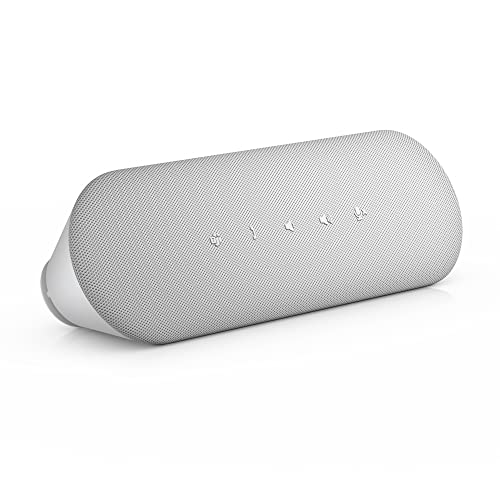
The Dell SP3022 mini soundbar is designed primarily for business environments, providing AI noise echo cancellation and full duplex audio that allow multiple people to speak simultaneously without losing clarity. It easily fits near your monitor or laptop, blending a compact and elegant aesthetic. Its USB-powered setup is straightforward, featuring LED indicators for MS Teams app status, call controls, volume, and mute functions. Certification by Microsoft Teams underlines its suitability for professional communication use.
INGA USB Monitor Speaker Bar for Desktop PC

The INGA computer speaker bar is a USB-powered audio solution featuring 10 watts of power driving two large speakers and a passive radiator for enhanced stereo sound. Its thoughtful design includes a spring clip with silicone pads, allowing it to securely attach to the top, bottom, or sides of most monitors up to 1 inch thick. This versatility helps reduce desk clutter while offering forward sound projection for immersive listening. This plug-and-play speaker bar needs only a single USB connection for power and audio, eliminating the need for 3.5mm cables or software installation.
Buying Guide: How to Choose the Best Speaker Bar for Your Monitor
When selecting a speaker bar for your monitor, consider the following key factors to find one that fits your specific needs:
- Connectivity Options: USB-powered bars simplify setup by requiring a single connection for power and audio. If you want versatility, consider models offering Bluetooth and 3.5mm AUX alongside USB.
- Sound Quality and Power: Look for speaker bars with clear stereo sound, good bass response, and sufficient wattage to fill your workspace. Features like passive radiators and upgraded drivers enhance audio clarity.
- Design and Mounting: Effective clip-on mechanisms enable easy attachment to various monitor thicknesses while saving desk space. A soundbar’s size should complement your monitor without obstruction.
- Additional Features: Some speaker bars include LED lighting effects or touch controls. If you use your monitor for gaming or media consumption, visual lighting synchronized with sound can enhance the experience.
- Intended Use Environment: For business or conferencing purposes, features like noise cancellation, microphone functions, and full duplex audio become critical. Certification for communication apps like MS Teams can also add value.
- Price and Brand Reliability: While price is not discussed here, choosing reputable brands known for quality and customer support is important for durability and performance.
Evaluating your workspace setup, audio preferences, and desired usability features helps you select the best speaker bar for your monitor that improves audio output without adding clutter.