Best TV Soundbar Adapters for Seamless Audio Connections
Choosing the right soundbar adapter for your TV can unlock richer audio without upgrading your entire system. This guide highlights five reliable HDMI ARC/ARC-compatible adapters that distribute audio to optical, coaxial, or analog inputs while keeping video in sync. Each option offers distinct outputs, setup steps, and caveats, so you can select based on your TV ports, speaker configuration, and preferred control methods.
Summary of Selected Products
| Product | Brand | Key Benefit |
|---|---|---|
| Tihokile 192KHz ARC Audio Extractor | Tihokile | |
| XPTSFDU HDMI ARC Adapter 4K60Hz | XPTSFDU | |
| Aodafy HDMI ARC Audio Extractor | Aodafy | |
| Hdiwousp HDMI ARC to Optical Adapter | Hdiwousp | |
| Ozvavzk |
Tihokile 192KHz ARC Audio Extractor

The Tihokile device is designed to pull audio from an HDMI ARC signal and deliver it to an optical and a 3.5mm analog output. It features a dedicated ARC input and outputs that help connect a TV to a soundbar or speaker system without HDMI pass-through. Important operating notes include that the unit has no HDMI output, requires a 5V/1A power supply, and should use the TV’s PCM/LPCM audio setting for compatibility. Dolby AC3 5.1 content is not supported. Volume control is accomplished through the TV’s CEC-enabled remote.
- ARC input to optical and 3.5mm outputs
- No HDMI output; keep HDMI connection to TV for video
- Not compatible with 5.1-channel Dolby formats
- Set TV audio to PCM/LPCM before use
- Volume adjustable via TV remote (CEC)
- Compatible with TVs, soundbars, and amplifiers
XPTSFDU HDMI ARC Adapter 4K60Hz

The XPTSFDU ARC adapter forwards audio from an ARC-enabled TV back to the converter, enabling connections to L/R channels and a 3.5mm output. It supports high-speed HDMI inputs and requires a TV with ARC and CEC enabled, along with a PCM2.0 audio format to ensure proper playback. The unit can output to both HDMI ARC-enabled TVs and external speakers via L/R and 3.5mm, offering flexible integration for soundbars or amplifiers. A stable HDMI cable is recommended for reliable signal transmission.
- HDMI ARC Input with L/R and 3.5mm outputs
- 4K60Hz capable; driver-free compatibility
- PCM2.0 required; ensure ARC is activated on TV
- Simultaneous audio outputs; some TVs may need ARC mode in settings
- High-speed HDMI cable recommended
Aodafy HDMI ARC Audio Extractor

The Aodafy ARC Audio Extractor splits TV audio from HDMI ARC into multiple outputs: optical, coaxial, 3.5mm, and RCA. It requires checking that the TV supports HDMI ARC or eARC and enabling CEC. After connecting, set the TV’s audio output to HDMI ARC and choose PCM format for compatibility. The product notes warn that not all HDMI-enabled soundbars will work with ARC-only devices. This solution is especially useful when pairing with a soundbar or external amplifier that accepts digital or analog inputs.
- ARC/eARC compatibility check required
- Outputs: optical, coaxial, 3.5mm, RCA
- 3-step setup: connect → enable CEC → set PCM
- Not all HDMI-only soundbars will work
- Works with most TV-to-speaker configurations
Hdiwousp HDMI ARC to Optical Adapter
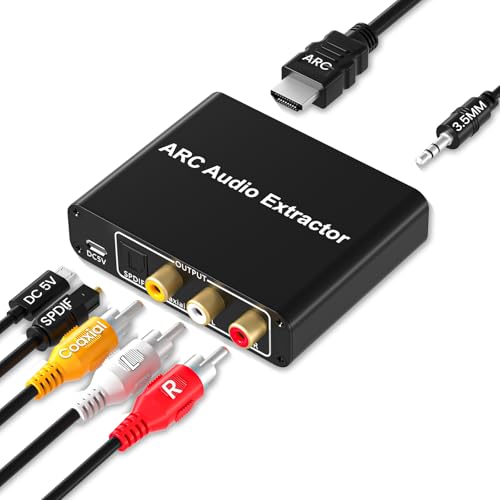
The Hdiwousp adapter specializes in extracting ARC audio and delivering it through optical, coaxial, RCA, and 3.5mm outputs. It supports multiple sampling rates up to 192 kHz and can handle Dolby AC3 and Digital Plus formats, providing a richer surround-sound experience when used with compatible gear. The device supports TV remote control of volume for L/R and 3.5mm outputs in ARC mode, though optical and coaxial outputs may require external volume control. A high-quality HDMI ARC connection and a PCM setting are important for best results.
- ARC audio extraction with multiple outputs
- Supports Dolby AC3 and Digital Plus
- High sampling rates up to 192 kHz
- TV remote volume control via ARC for L/R and 3.5mm
- Optical/coaxial outputs may require external volume control
Ozvavzk 3.5mm to Optical Adapter

Ozvavzk’s adapter converts analog 3.5mm audio into Toslink optical output. It’s described as an analog-to-digital converter, offering 96 kHz sampling, and supports uncompressed PCM audio. Important setup notes include selecting PCM/LPCM on the TV and turning off Dolby formats (Dolby Digital, DTS 5.1, Dolby-AC3) for proper operation. This option is best when you need to bridge a simple 3.5mm source to an optical input on a soundbar or receiver.
- Converts analog 3.5mm to Toslink optical
- Supports up to 96 kHz PCM output
- Not a true DAC; PCM/LPCM selection required
- Disable Dolby formats on TV for compatibility
- Compact aluminum build; simple plug-and-play
Buying Guide
When choosing a soundbar adapter for TV use, consider these core factors to ensure compatibility, ease of setup, and audio quality. Start with arc support and the availability of the outputs you need, then verify how you’ll control volume and what formats are supported by your TV and speakers.
- ARC vs. eARC compatibility: Ensure the adapter works with your TV’s ARC or eARC port. Some devices explicitly require ARC labeling and may not support eARC’s enhanced bandwidth.
- Output options: Optical, coaxial, 3.5mm, RCA, and sometimes HDMI. Decide which inputs your soundbar or receiver accepts and pick an adapter that can supply those connections simultaneously if needed.
- Audio formats and PCM compatibility: Many adapters support PCM 2.0 or 2.0/5.1 through different outputs. If you have a Dolby Digital 5.1 source, verify this is supported or that you’re using a compatible format.
- TV settings and control: Look for devices that allow TV remote control via CEC for volume on L/R and 3.5mm when using ARC. Some outputs may require manual volume control.
- Setup complexity: Some models require enabling HDMI ARC in TV settings and turning on CEC; others are plug-and-play. Consider how comfortable you are with TV menu adjustments.
- Power requirements: Most adapters need a 5V/1A power supply. Check that your available outlets and cables meet this requirement.
- Lag and synchronization: A well-implemented ARC extractor should preserve lip-sync. Look for products that emphasize low latency and driver-free operation when connecting multiple devices.
- Build quality and compatibility notes: Some adapters omit HDMI outputs or work only with certain brands. Review any brand-specific caveats or setup steps before purchasing.
| Consideration | What It Means |
|---|---|
| ARC/eARC support | Confirm TV port labeling and adapter compatibility to ensure audio returns correctly to the external speaker system. |
| Outputs offered | Choose based on your soundbar or receiver input availability; preferred options include optical, coaxial, and 3.5mm. |
| Audio formats | Check PCM/LPCM support and 5.1 compatibility if you use surround-sound content. |
| Remote control | Decide whether you want volume control via TV remote (CEC) or external volume management. |
| Setup complexity | Some devices require manual TV configuration; others are plug-and-play. |